
A utility marking can be clear one day, then gone the next. When markings fade or flags disappear, it becomes difficult to know exactly where utilities are located.
The SiteMap® mobile app introduces one of the biggest new features in SiteMap 3.0: augmented reality (AR), allowing you to stand on-site with a phone or tablet and view your utility information directly in the real world.
Using augmented reality, you can reference points on the map and see utility lines and point features appear at the surface through your device. When the paint marks fade or the flags disappear, you can see your utility lines placed directly over the area where you are working.
This feature addresses a key challenge in the building industry: having the right information at the right time. With accurate data in hand, field teams can avoid delays, prevent utility conflicts, and improve job site safety.
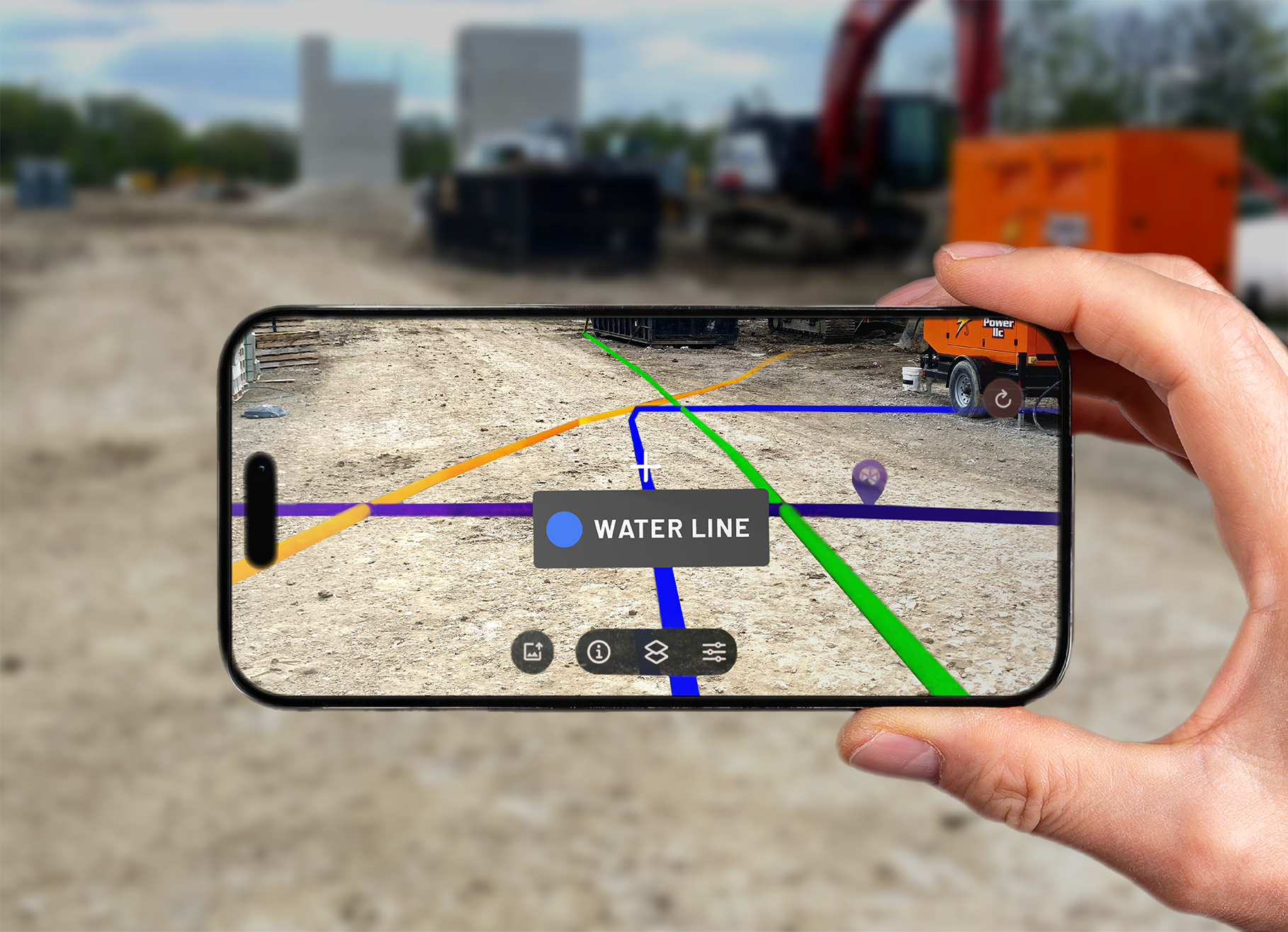
The SiteMap mobile app’s augmented reality feature helps field teams visualize underground utility mapping on-site, giving them quick access to accurate facility data from their mobile device.
Why Augmented Reality Matters
One of the biggest challenges on any job site or facility is keeping track of accurate building information over time. Because surface markings are often only temporary, a utility locate that was clear one day may be difficult or impossible to follow the next. This creates a risk for field teams who need reliable data to stay safe.
The augmented reality feature in SiteMap helps solve this problem. Instead of relying on markings that can disappear, teams can pull up a live view of their underground utilities on their mobile device. Even when surface marks are gone, the utility information is still available and easy to access.
How the AR Feature Works
The augmented reality feature in the SiteMap mobile app supports field teams by displaying mapped utilities overlaid onto their job site in real time.
To begin, open the mobile app and use the locator tool to find your position. The app uses the device’s GPS to place you on the map. Once you zoom into the correct level, the augmented reality option becomes available.
After selecting AR, the screen switches to the device’s camera view. The system will then prompt you to set anchor points on visible features in the environment. These features can include items like valves, drains, or utility structures that are already mapped in SiteMap.
Setting these anchor points allows the system to align the digital utility data with the real-world view. Once the points are set, the feature locks into place and begins displaying your GPRS-verified utility lines across the surface.
From there, you can move the phone or tablet to look around the site. Utility lines and point features appear in place as you walk your site in real time.
What You Can See in AR
The augmented reality view shows utility data that has been located and verified in the field by GPRS. This includes both line work and point features such as valves, drains, and other mapped assets.
As you move your device, utilities appear across the surface. When you hover over a feature, the app can identify the utility type, helping you understand what system you are looking at.
Common utility types visible in AR include:
- Water lines
- Communication lines
- Irrigation systems
- Drainage features
This level of visibility is especially useful in areas where utilities are difficult to track using surface markings alone. Instead of relying on memory or outdated drawings, you can see how utilities are laid out in relation to your surroundings.
Accuracy and Data Confidence
Accuracy is a critical part of any building map or underground utility mapping software. The augmented reality feature in SiteMap uses data from trained GPRS Project Managers. They collect this data with advanced tools and proven methods.
This data is gathered using a process called Subsurface Investigation Methodology (SIM), a standardized approach that combines advanced technology, expert training, and proven field practices to consistently deliver accurate results and reduce the risk of missed utilities. GPS collection using RTK allows GPRS to capture utility locations with a high level of precision.
The result is utility data that is accurate and reliable. When you view this information in augmented reality, you are seeing verified data that reflects real-world conditions.
The AR experience itself also depends on how well anchor points are set. When used correctly, the feature aligns with the collected data, providing a solid basis for your observations.
Benefits for Field Teams
The main benefit of the AR feature is improved awareness in the field. Instead of relying on static maps or temporary markings, teams can interact with utility data in a more direct and visual way.

SiteMap® augmented reality overlays verified underground utilities onto your job site in real time, keeping critical information visible even after surface markings disappear.
This supports better planning and safer work across a range of tasks. Teams can use the mobile app during pre-dig meetings, before trenching or potholing, or during a site walk.
With a clearer view of what is below the surface, teams can reduce guesswork and make more informed decisions. This is especially important in busy environments where multiple systems overlap. The feature also supports faster communication. When everyone can see the same information on-site, it becomes easier to coordinate and stay aligned.
Use Across Facilities and Job Sites
The augmented reality feature can be utilized in many different environments.
On a construction site, it helps crews visualize utilities before digging begins. This reduces the chance of utility strikes and keeps projects moving forward.
For facility managers, it provides a more interactive facility map. Teams can quickly access information about underground systems without needing to search through files or drawings.
In building environments, the feature supports maintenance and renovation work. By understanding where utilities are located, teams can plan repairs and upgrades with greater confidence.
It can also be useful in challenging conditions. Snow, rain, and heavy traffic can hide surface markings, but augmented reality allows users to see utilities regardless of what is happening on the surface.
Future Enhancements
The augmented reality feature in SiteMap continues to evolve. Future updates are expected to expand how data is presented in the AR view.
One planned improvement is the addition of more advanced three-dimensional visualization. This would allow you to see utilities below the surface, including depth information, rather than only viewing them at ground level.
These updates will provide a clearer understanding of underground systems and continue to improve how you can interact with your building map and construction map in the field.
Bring Underground Utility Data Into View
The SiteMap Mobile augmented reality feature changes how teams work with utility data. By combining real-world views with accurate digital information, it provides a more practical way to manage underground infrastructure.
Instead of relying on markings that can fade or disappear, you can access a clear and reliable view of your utilities at anytime from anywhere. This improves safety, reduces risk, and supports better decision-making across all job sites.
Click below to schedule your personal SiteMap demo to see the AR feature in action.
FREQUENTLY ASKED QUESTIONS
How does SiteMap help teams track changes over time?
SiteMap’s History Slider lets teams filter utility data by date range, helping facility teams review past projects, compare historical information with current conditions, and keep records organized for planning, audits, and maintenance.
Can SiteMap help teams measure distances and areas?
Yes. SiteMap’s measuring tools allow teams to calculate distances and areas directly inside the platform. Teams can use these tools to check utility runs, confirm clearances, estimate materials, plan scan coverage, and verify project boundaries without leaving the interactive map.
Can SiteMap scale as my portfolio grows?
Yes. SiteMap was created to accommodate scalability. Whether you oversee a single facility or a nationwide portfolio, the platform merges your data into one interactive system. You can keep adding new projects using the same workflow. This lets you expand without changing your process.